
Most SAT test day checklists read like a packing list for a school trip. The honest version is shorter and harsher: three things can get you turned away at the door, and everything else on the list is recoverable. Your photo ID, your charged testing device with exam setup finished, and your body inside the building before the doors close. Miss one of those and the pencils do not matter.
This is a full SAT test day checklist built from College Board's own published rules rather than from other people's blog posts, with the timings, the prohibited list, and the specific mistakes that send students home.
Key Takeaways
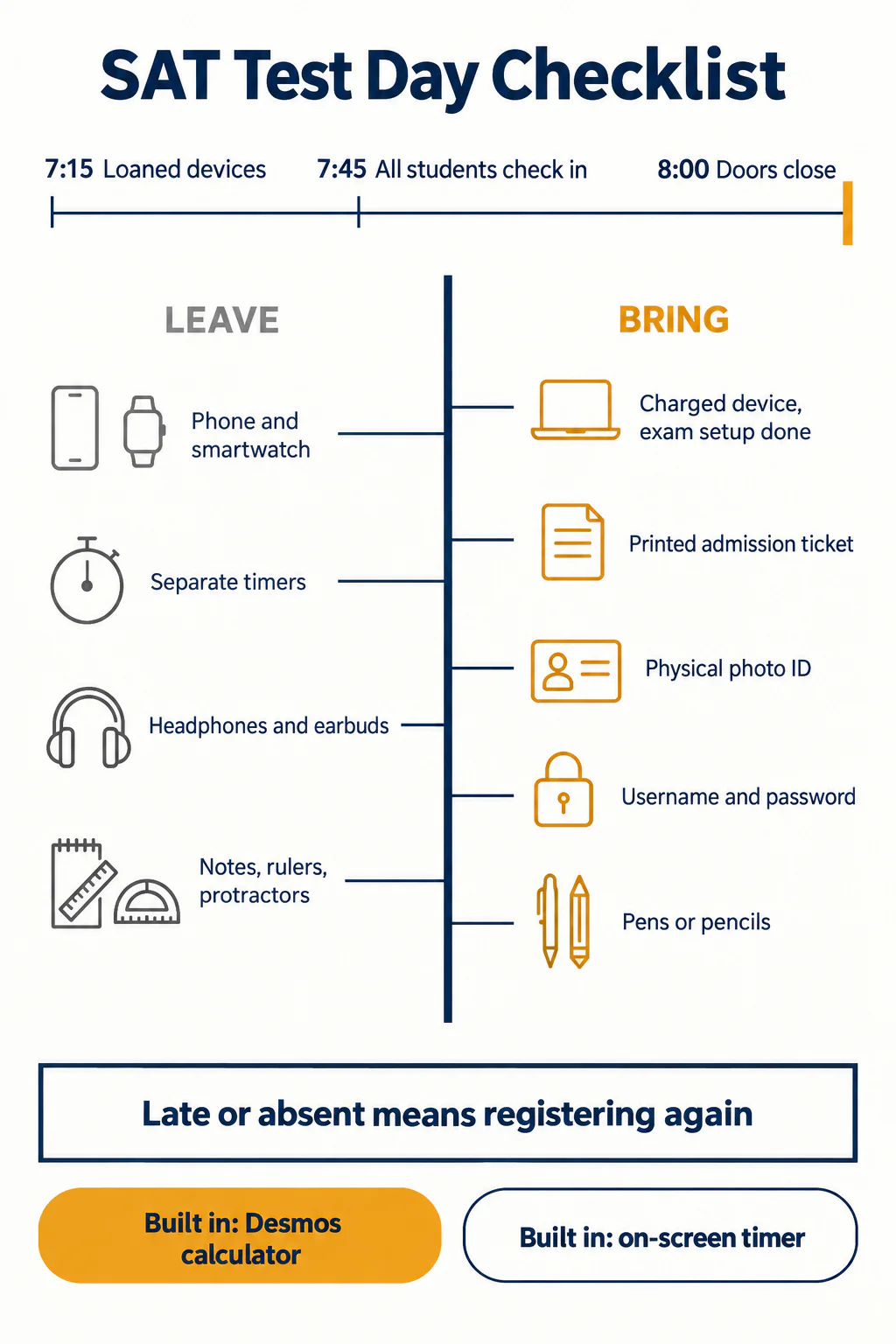
- Doors close at 8:00 a.m. in College Board's sample schedule, and there is no admission after testing starts. If you are late or absent, you register and pay again.
- Your device must have exam setup completed before you leave home, not just the Bluebook app installed. These are two different steps.
- Your ID must be a physical document. A photo of it on your phone is not an ID, and your phone is being collected anyway.
- Bluebook has a built-in Desmos calculator and an on-screen timer, so a personal calculator and a watch are backups, not requirements.
- Separate timers of any type are banned, along with smartwatches, earplugs, rulers and scratch paper you brought yourself.
What actually has to be in your bag
College Board splits test day items into things you must bring and things you may bring. The required list is five items long.
- Your testing device, fully charged, with the Bluebook application installed and exam setup completed.
- Your admission ticket, up to date, from the Bluebook app. College Board says a printed ticket is preferred.
- An acceptable photo ID. College Board's wording is blunt: "This must be a physical document, not electronic."
- Your College Board username and password. You sign in on the device in the room.
- Pencils or pens for scratch work. Scratch paper is handed out at the test center; you do not bring your own.
Optional but sensible: a charging cable or portable charger, a bag, a drink and a snack for the break, an analog or simple digital watch with no audible alarm, and a backup testing device if you have one. If you test on a tablet you may bring an external keyboard and mouse. If you are approved for the embedded text-to-speech accommodation, you must bring your own wired, non-Bluetooth headphones, because the ones the room has are not an option.
Epinephrine auto-injectors are permitted without any accommodation request. They go in a clear bag stored under your desk.
The step most students skip: exam setup
Installing Bluebook and completing exam setup are not the same thing, and this is the single most common avoidable problem on test morning. Exam setup is a separate process inside the app that confirms your device can run the exam and generates your admission ticket. It has to be done before you arrive.
Do it at home, on the machine you are actually taking, with the charger plugged in. Then open the app once more the night before to check that the ticket is still showing the right test center and the right date. If your device is borrowed from College Board, note that borrowing requests have to be made at least 30 days before test day, so that decision belongs to registration week, not test week.
What time do you actually need to arrive?
Earlier than the number in your head. College Board's published sample schedule runs like this:
| Time | What happens |
|---|---|
| 7:15 a.m. | Students with loaned devices arrive |
| 7:45 a.m. | All students check into the test center |
| 8:00 a.m. | Test center doors close |
| 8:15 to 8:30 a.m. | Testing starts |
| 10:45 to 11:00 a.m. | Standard time testing ends |
That schedule is a sample. College Board's own instruction is to "confirm your test center's arrival time on your admission ticket," because centers differ. Treat the ticket as the authority and the table above as the shape of the morning.
The consequence of missing it is worth stating plainly, in College Board's words: "If you're late or absent on test day, you'll need to register again, and the standard testing fees will apply." Not a rescheduling fee. A second registration. For the 2026-27 year, the remaining weekend dates are Nov. 7 (registration closes Oct. 23), Dec. 5 (Nov. 20), then a gap until March 6, 2027. A missed October sitting costs a month; a missed December sitting costs a season, and for seniors it can cost the application cycle.
Not sure where your teen stands? A free consultation with Catalyst Test Prep maps exactly which SAT topics need the most work, so you're never guessing about study time.
Book a Free Consultation →What can get you turned away at the door?
Three things, in order of how often they happen.
- The ID. It has to be a physical photo ID, and the name has to match your registration. Students who rely on a photo of their ID, or on a school ID card that has no photo, are the classic casualty.
- The device. Uncharged, un-updated, or without exam setup completed. A charging cable is allowed, but you cannot count on a socket next to your desk.
- The clock. Traffic, a parent's misread of the ticket, a test center on a campus where the building is not the one on the map.
Everything else on the list has a workaround. Forgot a pen? Somebody has a spare. Forgot your snack? You lose a little energy. Forgot your calculator? Bluebook has one built in, which brings us to the most over-packed item on test day.
Do you need to bring a calculator at all?
No, and most students should not bother. Bluebook contains an embedded Desmos calculator with graphing and scientific modes that you can toggle between, and it is available on every question in the Math section. There is no no-calculator module on the digital SAT.
If you do bring your own, College Board's rules are specific. Graphing calculators are fine as long as they do not include CAS, a computer algebra system. Calculators with QWERTY keyboards, wireless internet, Bluetooth or cellular connectivity are banned outright. You must "remove programs that have algebra functionality" and "remove any stored documents." No power cords, and during Reading and Writing, the calculator goes under your desk.
The advice College Board gives is the advice a tutor would give: "don't bring a calculator new to you. Bring one you know." A borrowed graphing calculator you have never used is worse than no calculator at all, because the fallback is a tool you also have not practised with. If you plan to lean on Desmos, practise on Desmos, in Bluebook, on full-length tests. Our guide to how the digital SAT works end to end covers where in the Math section that pays off most.
The banned list is stricter than most students expect
Unless you have an approved accommodation, you cannot access any of the following at any point, including during the break:
- Phones, smartwatches, fitness trackers, smart glasses and other wearable technology. Simple digital non-smartwatches and analog watches are acceptable.
- Audio players, Bluetooth devices including wireless earbuds, and any other electronic device apart from your testing device or a backup.
- Separate timers of any type. Including the small silent one you were going to put on the desk.
- Headphones, earbuds and earplugs.
- Notes, books, papers or any other reference material.
- Compasses, rulers, protractors and cutting devices.
- Detachable privacy screens, a stylus for an iPad, cameras and recording devices.
- External keyboards for laptops and Chromebooks. Keyboards for tablets are allowed.
The penalty language is not softened either: if a prohibited electronic device makes noise or you are seen with it at any time, including during breaks, you may be dismissed immediately, your scores may be canceled, and the device may be confiscated and its contents inspected.
Read that as a practical instruction rather than a threat. Silence your phone before you enter, hand it over or bury it in a bag, and do not retrieve it during the break to check a message. The break is when this rule is broken.
What the test itself looks like
Standard testing time is 2 hours and 14 minutes. Reading and Writing runs 64 minutes in two 32-minute modules, 54 questions in total. Math runs 70 minutes in two 35-minute modules, 44 questions. Between the two sections there is one 10-minute break.
Both sections are adaptive at the module level: how you perform on the first module decides whether the second module is harder or easier. That is worth knowing on test day for one reason only, and it is a reason to stay calm rather than to strategise. A second module that feels difficult is usually a good sign, not a bad one. Students who conclude mid-test that they are failing and give up on Module 2 do real damage to their own score. If the mechanics of that still feel unclear, read how the adaptive modules actually work before test day rather than wondering about it in the room.
During the break: leave your device open, do not close the lid, keep your ID with you, and be back on time. Unscheduled breaks outside that window eat into your own testing time, because the clock does not stop for you.
The night before and the morning of
The night before is not a study session. It is an equipment check.
- Charge the device to full and pack the cable.
- Open Bluebook, confirm exam setup is complete and the ticket shows the right center and date.
- Print the ticket.
- Put the physical ID in the bag, not on the hall table.
- Pack pens, a drink, a snack, and a watch if you want one.
- Set two alarms and work backwards from a 7:45 a.m. check-in, not from 8:00.
In the morning, eat something with protein in it. The Math section falls in the back half of the sitting, roughly two hours after breakfast, and that is exactly when a sugar-only breakfast stops paying. Take the snack for the break for the same reason.
Do not do practice questions on the drive. There is no evidence a last-minute question helps, and there is a well-known effect where getting one wrong at 7:30 a.m. dents the confidence you need at 8:30. If you want something to do with the nervous energy, re-read your own error log rather than attempting anything new.
What if something goes wrong on test day?
Device dies mid-test: raise your hand. Test centers have loaner devices and your work is saved; this is a recoverable problem and staff deal with it routinely. The wrong move is to keep quiet and lose testing minutes.
You feel the test went badly: do nothing that day. Score cancellation has its own deadline and its own trade-offs, and the decision is almost always better made with real scores in front of you. We covered when cancelling a score is and is not worth it separately, and the short version is that most students who want to cancel on the day are wrong about how they did.
You wake up ill: this is a registration decision, not a test-day one, and the deadlines are earlier than people assume. Changing or cancelling an SAT registration has to happen days before test day, not on the morning.
What to do with this
Print the required list, put it next to your bag, and do the Bluebook check the night before rather than the morning of. The checklist itself takes ten minutes and removes the entire category of problems that has nothing to do with how well you know the maths.
Then treat the last week for what it is. The gap between a practice score and a real score is mostly pacing, stamina and nerves, not content, and none of those improve by cramming a new topic in the final days. If you want a second opinion on what the last week should contain, that is a conversation worth having with someone who has seen the pattern before.
Ready to turn a prep plan into real score gains? Catalyst's 1:1 live online SAT programme starts with a free consultation to benchmark your teen's starting point and build a personalised path to their goal score.
Book a Free ConsultationSources: College Board, What to Bring on SAT Test Day, Prohibited Devices, Calculator Policy and Dates and Deadlines, all checked 24 September 2026.